Docs Home → Develop Applications → MongoDB Manual
Data Modeling
On this page
Data modeling refers to the organization of data within a database and the links between related entities. Data in MongoDB has a flexible schema model, which means:
Documents within a single collection are not required to have the same set of fields.
A field's data type can differ between documents within a collection.
Generally, documents in a collection share a similar structure. To ensure consistency in your data model, you can create schema validation rules.
Use Cases
The flexible data model lets you organize your data to match your application's needs. MongoDB is a document database, meaning you can embed related data in object and array fields.
A flexible schema is useful in the following scenarios:
Your company tracks which department each employee works in. You can embed department information inside of the
employeecollection to return relevant information in a single query.Your e-commerce application shows the five most recent reviews when displaying a product. You can store the recent reviews in the same collection as the product data, and store older reviews in a separate collection because the older reviews are not accessed as frequently.
Your clothing store needs to create a single-page application for a product catalog. Different products have different attributes, and therefore use different document fields. However, you can store all of the products in the same collection.
Schema Design: Differences between Relational and Document Databases
When you design a schema for a document database like MongoDB, there are a couple of important differences from relational databases to consider.
Relational Database Behavior | Document Database Behavior |
|---|---|
You must determine a table's schema before you insert data. | Your schema can change over time as the needs of your application
change. |
You often need to join data from several different tables to
return the data needed by your application. | The flexible data model lets you store data to match the way your
application returns data, and avoid joins. Avoiding joins across
multiple collections improves performance and reduces your
deployment's workload. |
Plan Your Schema
To ensure that your data model has a logical structure and achieves optimal performance, plan your schema prior to using your database at a production scale. To determine your data model, use the following schema design process:
Link Related Data
When you design your data model in MongoDB, consider the structure of your documents and the ways your application uses data from related entities.
To link related data, you can either:
Embed related data within a single document.
Store related data in a separate collection and access it with a reference.
Embedded Data
Embedded documents store related data in a single document structure. A document can contain arrays and sub-documents with related data. These denormalized data models allow applications to retrieve related data in a single database operation.
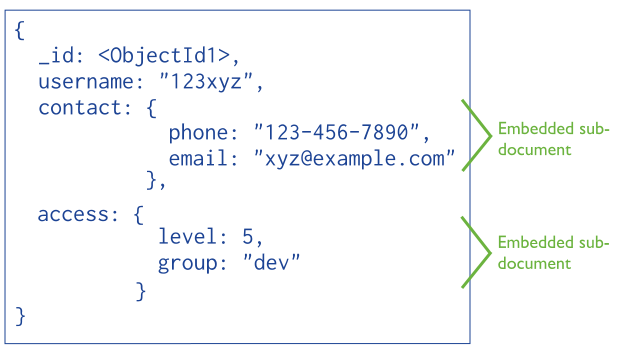
For many use cases in MongoDB, the denormalized data model is optimal.
To learn about the strengths and weaknesses of embedding documents, see Embedded Data Models.
References
References store relationships between data by including links, called
references, from one document to another. For example, a
customerId field in an orders collection indicates a reference
to a document in a customers collection.
Applications can resolve these references to access the related data. Broadly, these are normalized data models.
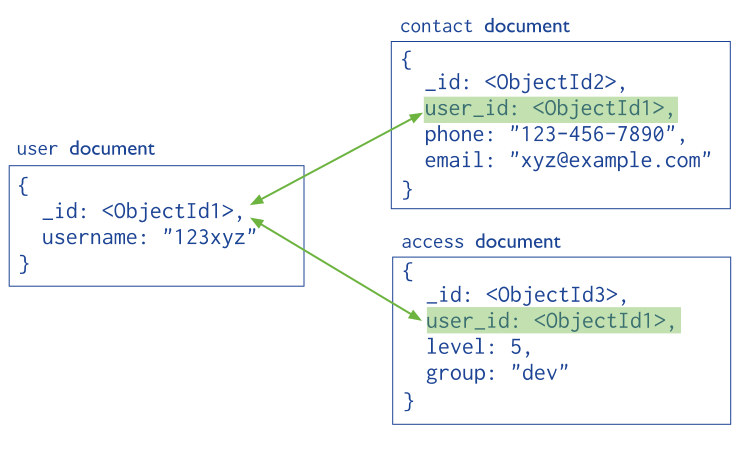
To learn about the strengths and weaknesses of using references, see References.
Additional Data Modeling Considerations
The following factors can impact how you plan your data model.
Data Duplication and Consistency
When you embed related data in a single document, you may duplicate data between two collections. Duplicating data lets your application query related information about multiple entities in a single query while logically separating entities in your model.
For example, a products collection stores the five most recent
reviews in a product document. Those reviews are also stored in a
reviews collection, which contains all product reviews. When a new
review is written, the following writes occur:
The review is inserted into the
reviewscollection.The array of recent reviews in the
productscollection is updated with$popand$push.
If the duplicated data is not updated often, then there is minimal additional work required to keep the two collections consistent. However, if the duplicated data is updated often, using a reference to link related data may be a better approach.
Before you duplicate data, consider the following factors:
How often the duplicated data needs to be updated.
The performance benefit for reads when data is duplicated.
To learn more, see Handle Duplicate Data.
Indexing
To improve performance for queries that your application runs frequently, create indexes on commonly queried fields. As your application grows, monitor your deployment's index use to ensure that your indexes are still supporting relevant queries.
Hardware Constraints
When you design your schema, consider your deployment's hardware, especially the amount of available RAM. Larger documents use more RAM, which may cause your application to read from disk and degrade performance. When possible, design your schema so only relevant fields are returned by queries. This practice ensures that your application's working set does not grow unnecessarily large.
Single Document Atomicity
In MongoDB, a write operation is atomic on the level of a single document, even if the operation modifies multiple embedded documents within a single document. This means that if an update operation affects several sub-documents, either all of those sub-documents are updated, or the operation fails entirely and no updates occur.
A denormalized data model with embedded data combines all related data in a single document instead of normalizing across multiple documents and collections. This data model allows atomic operations, in contrast to a normalized model where operations affect multiple documents.
For more information see Atomicity.
Learn More
Learn how to structure documents and define your schema in MongoDB University's M320 Data Modeling course.
For more information on data modeling with MongoDB, download the MongoDB Application Modernization Guide.
The download includes the following resources:
Presentation on the methodology of data modeling with MongoDB
White paper covering best practices and considerations for migrating to MongoDB from an RDBMS data model
Reference MongoDB schema with its RDBMS equivalent
Application Modernization scorecard