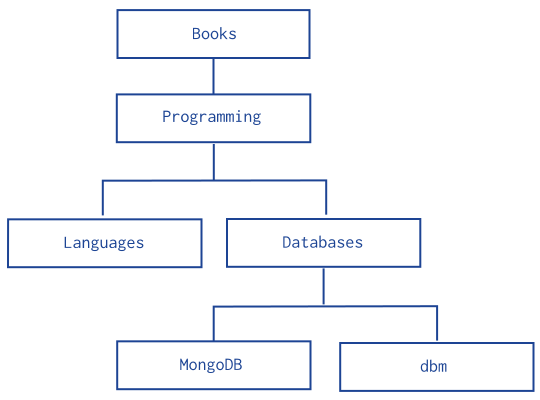
Trees in MongoDB

The best way to store a tree usually depends on the operations you want to perform; see below for some different options.  In practice, most developers find that one of the "Full Tree in Single Document", "Parent Links", and "Array of Ancestors" patterns works best.

Patterns

Full Tree in Single Document

{
  comments: [
    {by: "mathias", text: "...", replies: []}
    {by: "eliot", text: "...", replies: [
      {by: "mike", text: "...", replies: []}
    ]}
  ]
}

Pros:

  • Single document to fetch per page
  • One location on disk for whole tree
  • You can see full structure easily

Cons:

  • Hard to search
  • Hard to get back partial results
  • Can get unwieldy if you need a huge tree (there is a 4MB per doc limit)

Parent Links

Storing all nodes in a single collection, with each node having the id of its parent, is a simple solution. The biggest problem with this approach is getting an entire subtree requires several query turnarounds to the database (or use of db.eval).

> t = db.tree1;

> t.find()
{ "_id" : 1 }
{ "_id" : 2, "parent" : 1 }
{ "_id" : 3, "parent" : 1 }
{ "_id" : 4, "parent" : 2 }
{ "_id" : 5, "parent" : 4 }
{ "_id" : 6, "parent" : 4 }

> // find children of node 4
> t.ensureIndex({parent:1})
> t.find( {parent : 4 } )
{ "_id" : 5, "parent" : 4 }
{ "_id" : 6, "parent" : 4 }

Child Links

Another option is storing the ids of all of a node's children within each node's document. This approach is fairly limiting, although ok if no operations on entire subtrees are necessary. It may also be good for storing graphs where a node has multiple parents.

> t = db.tree2
> t.find()
{ "_id" : 1, "children" : [ 2, 3 ] }
{ "_id" : 2 }
{ "_id" : 3, "children" : [ 4 ] }
{ "_id" : 4 }

> // find immediate children of node 3
> t.findOne({_id:3}).children
[ 4 ]

> // find immediate parent of node 3
> t.ensureIndex({children:1})
> t.find({children:3})
{ "_id" : 1, "children" : [ 2, 3 ] }

Array of Ancestors

Here we store all the ancestors of a node in an array. This makes a query like "get all descendents of x" fast and easy.

> t = db.mytree;

> t.find()
{ "_id" : "a" }
{ "_id" : "b", "ancestors" : [ "a" ], "parent" : "a" }
{ "_id" : "c", "ancestors" : [ "a", "b" ], "parent" : "b" }
{ "_id" : "d", "ancestors" : [ "a", "b" ], "parent" : "b" }
{ "_id" : "e", "ancestors" : [ "a" ], "parent" : "a" }
{ "_id" : "f", "ancestors" : [ "a", "e" ], "parent" : "e" }
{ "_id" : "g", "ancestors" : [ "a", "b", "d" ], "parent" : "d" }

> t.ensureIndex( { ancestors : 1 } )

> // find all descendents of b:
> t.find( { ancestors : 'b' })
{ "_id" : "c", "ancestors" : [ "a", "b" ], "parent" : "b" }
{ "_id" : "d", "ancestors" : [ "a", "b" ], "parent" : "b" }
{ "_id" : "g", "ancestors" : [ "a", "b", "d" ], "parent" : "d" }

> // get all ancestors of f:
> anc = db.mytree.findOne({_id:'f'}).ancestors
[ "a", "e" ]
> db.mytree.find( { _id : { $in : anc } } )
{ "_id" : "a" }
{ "_id" : "e", "ancestors" : [ "a" ], "parent" : "a" }

ensureIndex and MongoDB's multikey feature makes the above queries efficient.

In addition to the ancestors array, we also stored the direct parent in the node to make it easy to find the node's immediate parent when that is necessary.

Materialized Paths (Full Path in Each Node)

Materialized paths make certain query options on trees easy.  We store the full path to the location of a document in the tree within each node.  Usually the "array of ancestors" approach above works just as well, and is easier as one doesn't have to deal with string building, regular expressions, and escaping of characters.  (Theoretically, materialized paths will be slightly faster.)

The best way to do this with MongoDB is to store the path as a string and then use regex queries.  Simple regex expressions beginning with "^" can be efficiently executed.  As the path is a string, you will need to pick a delimiter character -- we use ',' below.  For example:

> t = db.tree
test.tree

> // get entire tree -- we use sort() to make the order nice
> t.find().sort({path:1})
{ "_id" : "a", "path" : "a," }
{ "_id" : "b", "path" : "a,b," }
{ "_id" : "c", "path" : "a,b,c," }
{ "_id" : "d", "path" : "a,b,d," }
{ "_id" : "g", "path" : "a,b,g," }
{ "_id" : "e", "path" : "a,e," }
{ "_id" : "f", "path" : "a,e,f," }
{ "_id" : "g", "path" : "a,b,g," }

> t.ensureIndex( {path:1} )

> // find the node 'b' and all its descendents:
> t.find( { path : /^a,b,/ } )
{ "_id" : "b", "path" : "a,b," }
{ "_id" : "c", "path" : "a,b,c," }
{ "_id" : "d", "path" : "a,b,d," }
{ "_id" : "g", "path" : "a,b,g," }

// or if its path not already known:
> b = t.findOne( { _id : "b" } )
{ "_id" : "b", "path" : "a,b," }
> t.find( { path : new RegExp("^" + b.path) } )
{ "_id" : "b", "path" : "a,b," }
{ "_id" : "c", "path" : "a,b,c," }
{ "_id" : "d", "path" : "a,b,d," }
{ "_id" : "g", "path" : "a,b,g," }

Ruby example: http://github.com/banker/newsmonger/blob/master/app/models/comment.rb

acts_as_nested_set

See http://api.rubyonrails.org/classes/ActiveRecord/Acts/NestedSet/ClassMethods.html

This pattern is best for datasets that rarely change as modifications can require changes to many documents.

See Also

  • Sean Cribbs blog post (source of several ideas on this page).

Enter labels to add to this page:
Please wait 
Looking for a label? Just start typing.

IF YOU HAVE A QUESTION, POST IT TO THE USER GROUP.

These pages are fine for comments, but for questions, your best bet will always be the MongoDB User Group.

blog comments powered by Disqus