Docs Home → Develop Applications → MongoDB Manual
Sharded Cluster Components
A MongoDB sharded cluster consists of the following components:
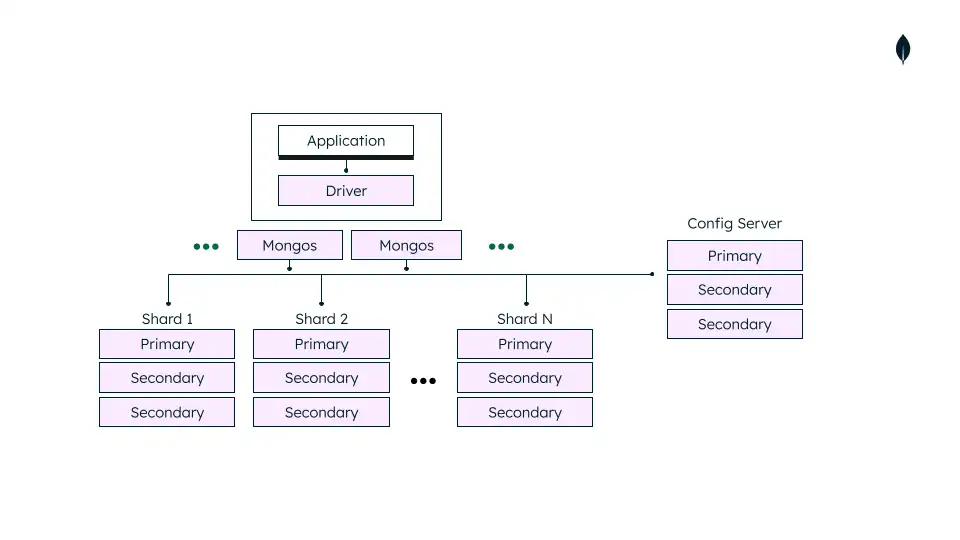
shard: Each shard contains a subset of the sharded data. Each shard must be deployed as a replica set.
mongos: The
mongosacts as a query router, providing an interface between client applications and the sharded cluster.mongoscan support hedged reads to minimize latencies.config servers: Config servers store metadata and configuration settings for the cluster. As of MongoDB 3.4, config servers must be deployed as a replica set (CSRS).
Production Configuration
In a production cluster, ensure that data is redundant and that your systems are highly available. Consider the following for a production sharded cluster deployment:
Deploy Config Servers as a 3 member replica set
Deploy each Shard as a 3 member replica set
Deploy one or more
mongosrouters
Replica Set Distribution
Where possible, consider deploying one member of each replica set in a site suitable for being a disaster recovery location.
Note
Distributing replica set members across two data centers provides benefit over a single data center. In a two data center distribution,
If one of the data centers goes down, the data is still available for reads unlike a single data center distribution.
If the data center with a minority of the members goes down, the replica set can still serve write operations as well as read operations.
However, if the data center with the majority of the members goes down, the replica set becomes read-only.
If possible, distribute members across at least three data centers. For config server replica sets (CSRS), the best practice is to distribute across three (or more depending on the number of members) centers. If the cost of the third data center is prohibitive, one distribution possibility is to evenly distribute the data bearing members across the two data centers and store the remaining member in the cloud if your company policy allows.
Number of Shards
Sharding requires at least two shards to distribute sharded data. Single shard sharded clusters may be useful if you plan on enabling sharding in the near future, but do not need to at the time of deployment.
Number of mongos and Distribution
mongos routers support high availability and scalability
when deploying multiple mongos instances. If a proxy or load
balancer is between the application and the mongos routers, you
must configure it for client affinity. Client affinity allows
every connection from a single client to reach the same mongos.
For shard-level high availability, either:
Add
mongosinstances on the same hardware wheremongosinstances are already running.Embed
mongosrouters at the application level.
mongos routers communicate frequently with your config
servers. As you increase the number of routers, performance may degrade.
If performance degrades, reduce the number of routers. Your deployment
should not have more than 30 mongos routers.
The following diagram shows a common sharded cluster architecture used in production:

Development Configuration
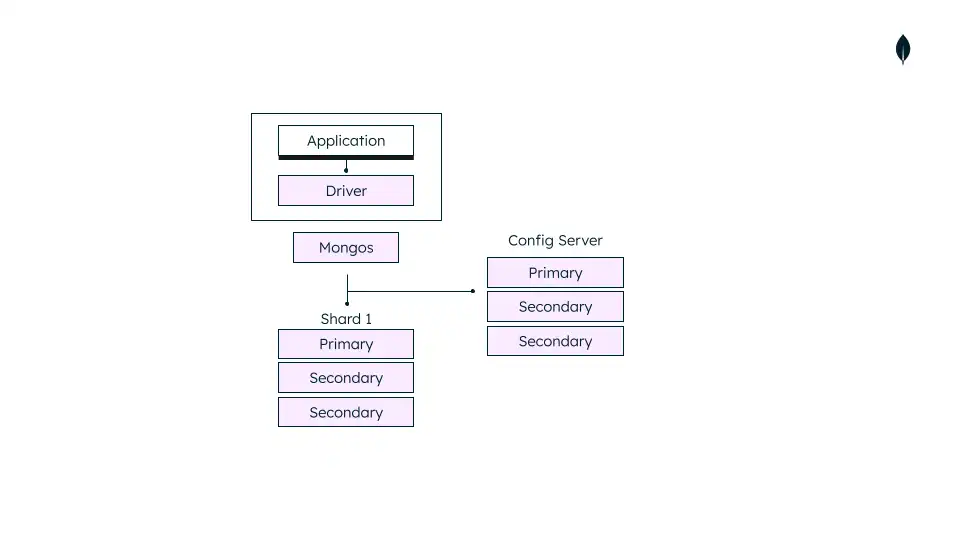
For testing and development, you can deploy a sharded cluster with a minimum number of components. These non-production clusters have the following components:
One
mongosinstance.A single shard replica set.
A replica set config server.
The following diagram shows a sharded cluster architecture used for development only:
Warning
Use the test cluster architecture for testing and development only.