Docs Home → Develop Applications → MongoDB Manual
Sharding
On this page
Sharding is a method for distributing data across multiple machines. MongoDB uses sharding to support deployments with very large data sets and high throughput operations.
Database systems with large data sets or high throughput applications can challenge the capacity of a single server. For example, high query rates can exhaust the CPU capacity of the server. Working set sizes larger than the system's RAM stress the I/O capacity of disk drives.
There are two methods for addressing system growth: vertical and horizontal scaling.
Vertical Scaling involves increasing the capacity of a single server, such as using a more powerful CPU, adding more RAM, or increasing the amount of storage space. Limitations in available technology may restrict a single machine from being sufficiently powerful for a given workload. Additionally, Cloud-based providers have hard ceilings based on available hardware configurations. As a result, there is a practical maximum for vertical scaling.
Horizontal Scaling involves dividing the system dataset and load over multiple servers, adding additional servers to increase capacity as required. While the overall speed or capacity of a single machine may not be high, each machine handles a subset of the overall workload, potentially providing better efficiency than a single high-speed high-capacity server. Expanding the capacity of the deployment only requires adding additional servers as needed, which can be a lower overall cost than high-end hardware for a single machine. The trade off is increased complexity in infrastructure and maintenance for the deployment.
MongoDB supports horizontal scaling through sharding.
You can shard collections in the UI for deployments hosted in MongoDB Atlas.
Sharded Cluster
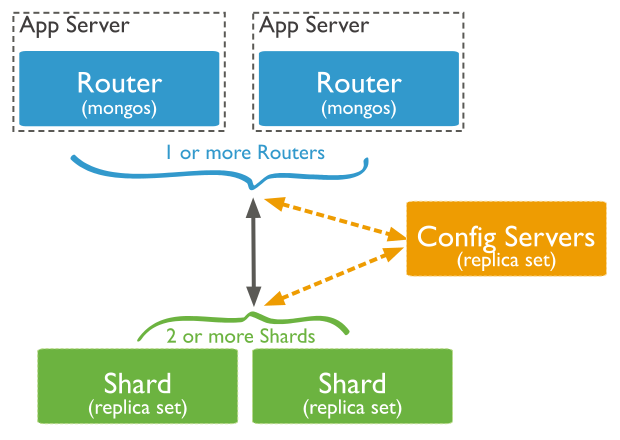
A MongoDB sharded cluster consists of the following components:
shard: Each shard contains a subset of the sharded data. Each shard must be deployed as a replica set.
mongos: The
mongosacts as a query router, providing an interface between client applications and the sharded cluster.mongoscan support hedged reads to minimize latencies.config servers: Config servers store metadata and configuration settings for the cluster. As of MongoDB 3.4, config servers must be deployed as a replica set (CSRS).
The following graphic describes the interaction of components within a sharded cluster:
MongoDB shards data at the collection level, distributing the collection data across the shards in the cluster.
Shard Keys
MongoDB uses the shard key to distribute the collection's documents across shards. The shard key consists of a field or multiple fields in the documents.
Documents in sharded collections can be missing the shard key fields. Missing shard key fields are treated as having null values when distributing the documents across shards but not when routing queries. For more information, see Missing Shard Key Fields.
You select the shard key when sharding a collection.
Starting in MongoDB 5.0, you can reshard a collection by changing a collection's shard key.
You can refine a shard key by adding a suffix field or fields to the existing shard key.
A document's shard key value determines its distribution across the shards.
Starting in MongoDB 4.2, you can update a document's shard key value unless your shard key field is the immutable
_idfield. See Change a Document's Shard Key Value for more information.In MongoDB 4.0 and earlier, a document's shard key field value is immutable.
Shard Key Index
To shard a populated collection, the collection must have an index that starts with the shard key. When sharding an empty collection, MongoDB creates the supporting index if the collection does not already have an appropriate index for the specified shard key. See Shard Key Indexes.
Shard Key Strategy
The choice of shard key affects the performance, efficiency, and scalability of a sharded cluster. A cluster with the best possible hardware and infrastructure can be bottlenecked by the choice of shard key. The choice of shard key and its backing index can also affect the sharding strategy that your cluster can use.
Tip
See also:
Chunks
MongoDB partitions sharded data into chunks. Each chunk has an inclusive lower and exclusive upper range based on the shard key.
Balancer and Even Data Distribution
In an attempt to achieve an even distribution of data across all shards in the cluster, a balancer runs in the background to migrate ranges across the shards.
Tip
See also:
Advantages of Sharding
Reads / Writes
MongoDB distributes the read and write workload across the shards in the sharded cluster, allowing each shard to process a subset of cluster operations. Both read and write workloads can be scaled horizontally across the cluster by adding more shards.
For queries that include the shard key or the prefix of a compound shard key, mongos can target the query at a
specific shard or set of shards. These targeted
operations are generally more efficient than
broadcasting to every shard in the cluster.
mongos can support hedged reads
to minimize latencies.
Storage Capacity
Sharding distributes data across the shards in the cluster, allowing each shard to contain a subset of the total cluster data. As the data set grows, additional shards increase the storage capacity of the cluster.
High Availability
The deployment of config servers and shards as replica sets provide increased availability.
Even if one or more shard replica sets become completely unavailable, the sharded cluster can continue to perform partial reads and writes. That is, while data on the unavailable shard(s) cannot be accessed, reads or writes directed at the available shards can still succeed.
Considerations Before Sharding
Sharded cluster infrastructure requirements and complexity require careful planning, execution, and maintenance.
Once a collection has been sharded, MongoDB provides no method to unshard a sharded collection.
While you can reshard your collection later, it is important to carefully consider your shard key choice to avoid scalability and perfomance issues.
Tip
See also:
To understand the operational requirements and restrictions for sharding your collection, see Operational Restrictions in Sharded Clusters.
If queries do not include the shard key or the prefix of a
compound shard key, mongos performs
a broadcast operation, querying
all shards in the sharded cluster. These scatter/gather queries can
be long running operations.
Starting in MongoDB 5.1, when starting, restarting or adding a
shard server with sh.addShard() the
Cluster Wide Write Concern (CWWC)
must be set.
If the CWWC is not set and the shard is configured
such that the default write concern is
{ w : 1 } the shard server will fail to start or be added
and returns an error.
See default write concern calculations for details on how the default write concern is calculated.
Note
If you have an active support contract with MongoDB, consider contacting your account representative for assistance with sharded cluster planning and deployment.
Sharded and Non-Sharded Collections
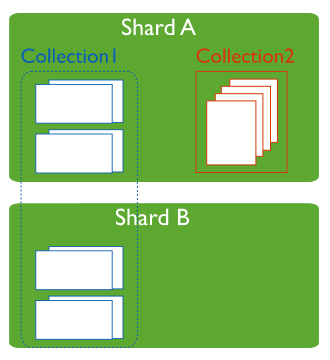
A database can have a mixture of sharded and unsharded collections. Sharded collections are partitioned and distributed across the shards in the cluster. Unsharded collections are stored on a primary shard. Each database has its own primary shard.
Connecting to a Sharded Cluster
You must connect to a mongos router to interact with any collection in the sharded cluster. This includes sharded and unsharded collections. Clients should never connect to a single shard in order to perform read or write operations.
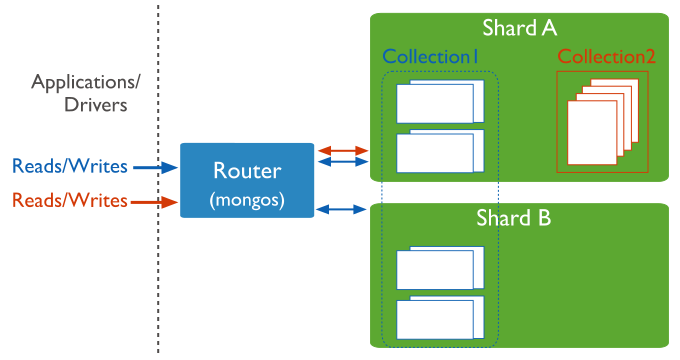
You can connect to a mongos the same way you connect to a
mongod using the mongosh or a
MongoDB driver.
Sharding Strategy
MongoDB supports two sharding strategies for distributing data across sharded clusters.
Hashed Sharding
Hashed Sharding involves computing a hash of the shard key field's value. Each chunk is then assigned a range based on the hashed shard key values.
Tip
MongoDB automatically computes the hashes when resolving queries using hashed indexes. Applications do not need to compute hashes.
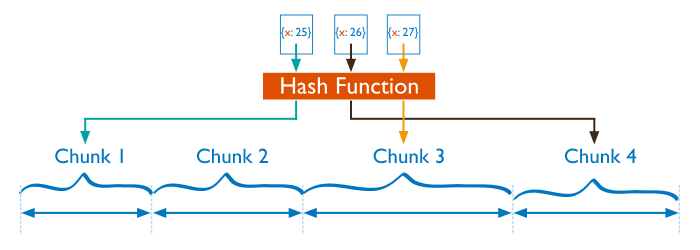
While a range of shard keys may be "close", their hashed values are unlikely to be on the same chunk. Data distribution based on hashed values facilitates more even data distribution, especially in data sets where the shard key changes monotonically.
However, hashed distribution means that range-based queries on the shard key are less likely to target a single shard, resulting in more cluster wide broadcast operations
See Hashed Sharding for more information.
Ranged Sharding
Ranged sharding involves dividing data into ranges based on the shard key values. Each chunk is then assigned a range based on the shard key values.
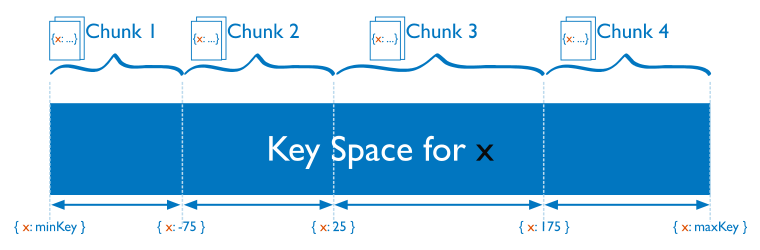
A range of shard keys whose values are "close" are more likely to reside on
the same chunk. This allows for targeted
operations as a mongos can route the
operations to only the shards that contain the required data.
The efficiency of ranged sharding depends on the shard key chosen. Poorly considered shard keys can result in uneven distribution of data, which can negate some benefits of sharding or can cause performance bottlenecks. See shard key selection for range-based sharding.
See Ranged Sharding for more information.
Zones in Sharded Clusters
Zones can help improve the locality of data for sharded clusters that span multiple data centers.
In sharded clusters, you can create zones of sharded data based on the shard key. You can associate each zone with one or more shards in the cluster. A shard can associate with any number of zones. In a balanced cluster, MongoDB migrates chunks covered by a zone only to those shards associated with the zone.
Each zone covers one or more ranges of shard key values. Each range a zone covers is always inclusive of its lower boundary and exclusive of its upper boundary.
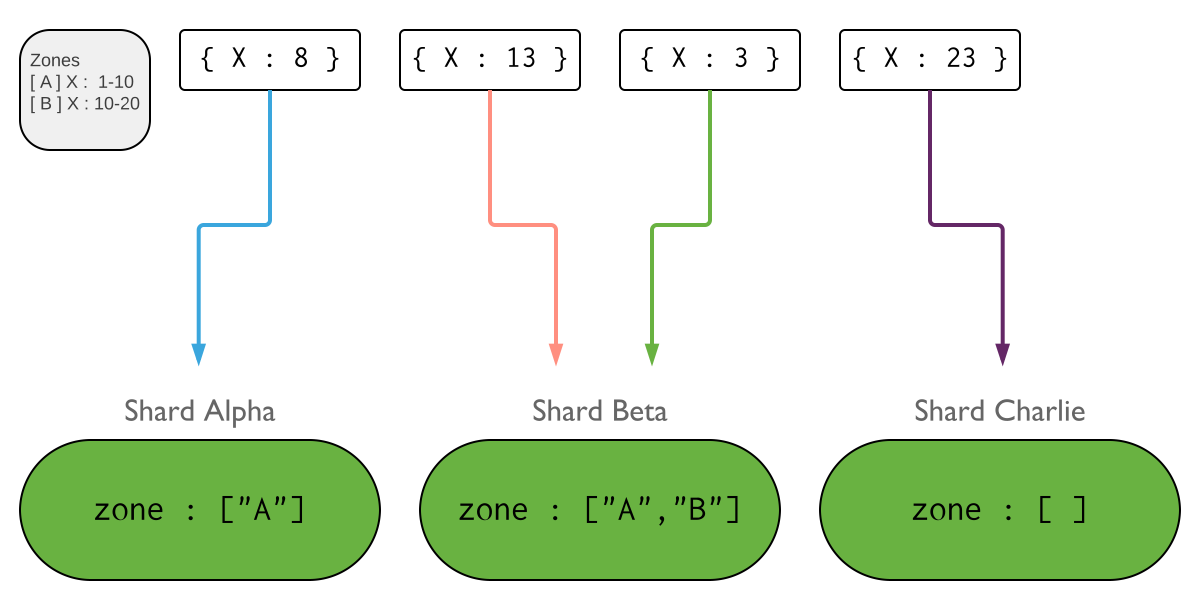
You must use fields contained in the shard key when defining a new range for a zone to cover. If using a compound shard key, the range must include the prefix of the shard key. See shard keys in zones for more information.
The possible use of zones in the future should be taken into consideration when choosing a shard key.
Tip
Starting in MongoDB 4.0.3, setting up zones and zone ranges before you shard an empty or a non-existing collection allows for a faster setup of zoned sharding.
See zones for more information.
Collations in Sharding
Use the shardCollection command with the collation :
{ locale : "simple" } option to shard a collection which has a
default collation. Successful
sharding requires that:
The collection must have an index whose prefix is the shard key
The index must have the collation
{ locale: "simple" }
When creating new collections with a collation, ensure these conditions are met prior to sharding the collection.
Note
Queries on the sharded collection continue to use the default
collation configured for the collection. To use the shard key
index's simple collation, specify {locale : "simple"}
in the query's collation document.
See shardCollection for more information about sharding
and collation.
Change Streams
Starting in MongoDB 3.6, change streams are available for replica sets and sharded clusters. Change streams allow applications to access real-time data changes without the complexity and risk of tailing the oplog. Applications can use change streams to subscribe to all data changes on a collection or collections.
Transactions
Starting in MongoDB 4.2, with the introduction of distributed transactions, multi-document transactions are available on sharded clusters.
Until a transaction commits, the data changes made in the transaction are not visible outside the transaction.
However, when a transaction writes to multiple shards, not all
outside read operations need to wait for the result of the committed
transaction to be visible across the shards. For example, if a
transaction is committed and write 1 is visible on shard A but write
2 is not yet visible on shard B, an outside read at read concern
"local" can read the results of write 1 without
seeing write 2.
Learn More
Practical MongoDB Aggregations E-Book
For more information on how sharding works with aggregations, read the sharding chapter in the Practical MongoDB Aggregations e-book.