Docs Home → Develop Applications → MongoDB Drivers
MongoDB PHP Driver
On this page
Introduction
Welcome to the documentation site for the official MongoDB PHP driver. You can add the driver to your application to work with MongoDB in PHP. The MongoDB PHP Driver consists of the following components:
The extension, which provides a low-level API and mainly serves to integrate libmongoc and libbson with PHP.
The library, which provides a high-level API for working with MongoDB databases consistent with other MongoDB language drivers.
While it is possible to use the extension alone, MongoDB recommends using both the extension and the library together. To learn more about the components of the PHP driver, see the Driver Architecture section of this page.
Navigate through the following links to learn more about the driver and access tutorial content on setting up a runnable project:
Driver Architecture
This section describes how the components of the PHP driver work together. These components fit into the following general categories:
High-Level API, which includes the library and other integrations
Extension, which includes the extension that integrates the system libraries
System, which includes the C Driver, BSON library, and encryption library
The following diagram illustrates the architecture of the PHP driver components:
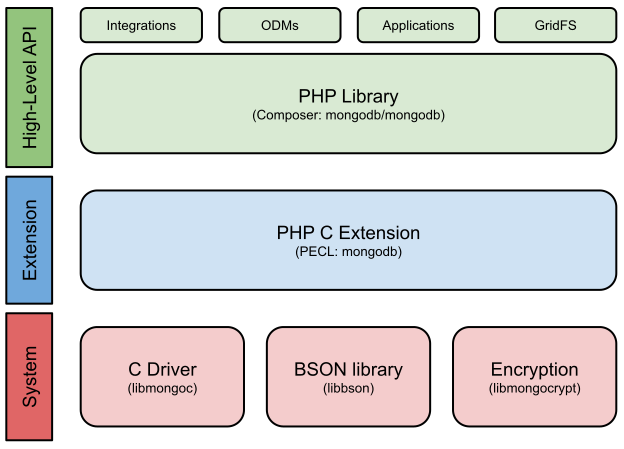
The PHP library provides an API that is consistent with the other MongoDB drivers. The library is continually updated to meet cross-driver specifications. You must add the library as a dependency to access MongoDB in most PHP applications.
The extension is distributed by using PECL, and connects PHP to the system libraries. The extension's public API provides the following functionality:
Connection management
BSON encoding and decoding
Object document serialization
Command execution
Cursor management
To learn more about the system libraries, see the C Driver documentation.
Connect to a Compatible MongoDB Deployment
You can use the PHP driver to connect to deployments hosted in the following environments:
MongoDB Atlas: The fully managed service for MongoDB deployments in the cloud
MongoDB Enterprise: The subscription-based, self-managed version of MongoDB
MongoDB Community: The source-available, free-to-use, and self-managed version of MongoDB
Installation
First, make sure you have a recent version of PHP installed on your system. See the official PHP manual for download and installation instructions.
Install the PHP MongoDB Extension before installing the PHP Library for MongoDB. You can install the extension using PECL on the command line:
sudo pecl install mongodb
Finally, add the following line to your php.ini file:
extension=mongodb.so
Note
On some systems, there may be multiple INI files for individual SAPIs (e.g. CLI, FPM). Make sure to enable the extension in all SAPIs that you need.
The preferred method of installing the PHP library is with Composer by running the following from your project root:
composer require mongodb/mongodb
Once you have installed the library, ensure that your application includes Composer's autoloader as in the following example:
require_once __DIR__ . '/vendor/autoload.php';
Additional installation instructions may be found in the library documentation.
Connect to MongoDB Atlas
You can use the following connection snippet to test your connection to your MongoDB deployment on Atlas:
use Exception; use MongoDB\Client; use MongoDB\Driver\ServerApi; // Replace the placeholder with your Atlas connection string $uri = '<connection string>'; // Specify Stable API version 1 $apiVersion = new ServerApi(ServerApi::V1); // Create a new client and connect to the server $client = new MongoDB\Client($uri, [], ['serverApi' => $apiVersion]); try { // Send a ping to confirm a successful connection $client->selectDatabase('admin')->command(['ping' => 1]); echo "Pinged your deployment. You successfully connected to MongoDB!\n"; } catch (Exception $e) { printf($e->getMessage()); }
This connection snippet uses the Stable API feature, which you can enable when using the PHP driver v1.9 and later to connect to MongoDB Server v5.0 and later. When you use this feature, you can update your driver or server without worrying about backward compatibility issues with any commands covered by the Stable API.
To learn more about the Stable API feature, see Stable API in the Server manual.
Note
Starting from February 2022, the Versioned API is known as the Stable API. All concepts and features remain the same with this naming change.
Connect to MongoDB Atlas Without the Stable API
If you are using a version of MongoDB or the driver that doesn't support the Stable API feature, you can use the following code snippet to test your connection to your MongoDB deployment on Atlas:
use Exception; use MongoDB\Client; // Replace the placeholder with your Atlas connection string $uri = '<connection string>'; // Create a new client and connect to the server $client = new MongoDB\Client($uri); try { // Send a ping to confirm a successful connection $client->selectDatabase('admin')->command(['ping' => 1]); echo "Pinged your deployment. You successfully connected to MongoDB!\n"; } catch (Exception $e) { printf($e->getMessage()); }
Connect to a MongoDB Server on Your Local Machine
If you need to run a MongoDB server on your local machine for development purposes instead of using an Atlas cluster, you need to complete the following:
Download the Community or Enterprise version of MongoDB Server.
Install and configure MongoDB Server.
Start the server.
Important
Always secure your MongoDB server from malicious attacks. See our Security Checklist for a list of security recommendations.
After you successfully start your MongoDB server, specify your connection string in your driver connection code.
If your MongoDB Server is running locally, you can use the connection string
"mongodb://localhost:<port>" where <port> is the port number you
configured your server to listen for incoming connections.
If you need to specify a different hostname or IP address, see our Server Manual entry on Connection Strings.
To test whether you can connect to your server, replace the connection string in the Connect to MongoDB Atlas code example and run it.
Compatibility
Due to potential problems representing 64-bit integers on 32-bit platforms, users are advised to use 64-bit environments. When using a 32-bit platform, be aware that any 64-bit integer read from the database will be returned as a MongoDB\BSON\Int64 instance instead of a PHP integer type.
MongoDB Compatibility
The following compatibility table specifies the recommended version or versions of the PHP driver for use with a specific version of MongoDB.
The first column lists the driver version.
Important
MongoDB ensures compatibility between the MongoDB Server and the drivers for three years after the server version's end of life (EOL) date. To learn more about the MongoDB release and EOL dates, see MongoDB Software Lifecycle Schedules.
Compatibility Table Legend
Icon | Explanation |
|---|---|
✓ | All features are supported. |
⊛ | The Driver version will work with the MongoDB version, but not all
new MongoDB features are supported. |
No mark | The Driver version is not tested with the MongoDB version. |
PHP Driver Versions | MongoDB 7.0 | MongoDB 6.0 | MongoDB 5.0 | MongoDB 4.4 | MongoDB 4.2 | MongoDB 4.0 | MongoDB 3.6 | MongoDB 3.4 | MongoDB 3.2 | MongoDB 3.0 | MongoDB 2.6 |
|---|---|---|---|---|---|---|---|---|---|---|---|
ext + lib 1.16 to 1.18 | ✓ | ✓ | ✓ | ✓ | ✓ | ✓ | ✓ | ||||
ext + lib 1.15 [1] | ⊛ | ✓ | ✓ | ✓ | ✓ | ✓ | ✓ | ||||
ext 1.14 + lib 1.13 | ⊛ | ✓ | ✓ | ✓ | ✓ | ✓ | ✓ | ||||
ext 1.13 + lib 1.12 | ⊛ | ⊛ | ✓ | ✓ | ✓ | ✓ | ✓ | ||||
ext 1.12 + lib 1.11 | ⊛ | ⊛ | ✓ | ✓ | ✓ | ✓ | ✓ | ✓ | ✓ | ✓ | |
ext 1.11 + lib 1.10 | ⊛ | ⊛ | ✓ | ✓ | ✓ | ✓ | ✓ | ✓ | ✓ | ✓ | |
ext 1.10 + lib 1.9 | ⊛ | ⊛ | ✓ [2] | ✓ | ✓ | ✓ | ✓ | ✓ | ✓ | ✓ | |
ext 1.9 + lib 1.8 | ⊛ | ⊛ | ⊛ | ✓ | ✓ | ✓ | ✓ | ✓ | ✓ | ✓ | |
ext 1.8 + lib 1.7 | ⊛ | ⊛ | ⊛ | ✓ | ✓ | ✓ | ✓ | ✓ | ✓ | ✓ | |
ext 1.7 + lib 1.6 | ⊛ | ⊛ | ⊛ | ⊛ | ✓ | ✓ | ✓ | ✓ | ✓ | ✓ | |
ext 1.6 + lib 1.5 | ⊛ | ⊛ | ⊛ | ⊛ | ✓ | ✓ | ✓ | ✓ | ✓ | ✓ | |
ext 1.5 + lib 1.4 | ⊛ | ⊛ | ⊛ | ⊛ | ⊛ | ✓ | ✓ | ✓ | ✓ | ✓ | |
ext 1.4 + lib 1.3 | ✓ | ✓ | ✓ | ✓ | ✓ | ||||||
ext 1.3 + lib 1.2 | ✓ | ✓ | ✓ | ✓ | |||||||
ext 1.2 + lib 1.1 | ✓ | ✓ | ✓ | ✓ | |||||||
ext 1.1 + lib 1.0 | ✓ | ✓ | ✓ | ||||||||
ext 1.0 | ✓ | ✓ |
| [1] | (1, 2) Version 1.14 of the MongoDB PHP library has been skipped to restore version parity between the library and extension. |
| [2] | The extension 1.10 + library 1.9 driver does not support snapshot reads on secondaries. For more information, see the MongoDB Server version 5.0 release notes. |
Language Compatibility
The following compatibility table specifies the recommended version or versions of the PHP driver for use with a specific version of PHP.
The first column lists the driver versions.
PHP Driver Versions | PHP 8.3 | PHP 8.2 | PHP 8.1 | PHP 8.0 | PHP 7.4 | PHP 7.3 | PHP 7.2 | PHP 7.1 | PHP 7.0 | PHP 5.6 | PHP 5.5 |
|---|---|---|---|---|---|---|---|---|---|---|---|
ext + lib 1.17 to 1.18 | ✓ | ✓ | ✓ | ✓ | ✓ | ||||||
ext + lib 1.16 | ✓ | ✓ | ✓ | ✓ | ✓ | ✓ | |||||
ext + lib 1.15 [1] | ✓ | ✓ | ✓ | ✓ | ✓ | ✓ | |||||
ext 1.14 + lib 1.13 | ✓ | ✓ | ✓ | ✓ | ✓ | ||||||
ext 1.13 + lib 1.12 | ✓ | ✓ | ✓ | ✓ | ✓ | ||||||
ext 1.12 + lib 1.11 | ✓ | ✓ | ✓ | ✓ | ✓ | ||||||
ext 1.11 + lib 1.10 | ✓ | ✓ | ✓ | ✓ | ✓ | ||||||
ext 1.10 + lib 1.9 | ✓ | ✓ | ✓ | ✓ | ✓ | ||||||
ext 1.9 + lib 1.8 | ✓ | ✓ | ✓ | ✓ | ✓ | ✓ | |||||
ext 1.8 + lib 1.7 | ✓ | ✓ | ✓ | ✓ | ✓ | ||||||
ext 1.7 + lib 1.6 | ✓ | ✓ | ✓ | ✓ | ✓ | ✓ | |||||
ext 1.6 + lib 1.5 | ✓ | ✓ | ✓ | ✓ | ✓ | ✓ | |||||
ext 1.5 + lib 1.4 | ✓ | ✓ | ✓ | ✓ | ✓ | ✓ | |||||
ext 1.4 + lib 1.3 | ✓ | ✓ | ✓ | ✓ | ✓ | ||||||
ext 1.3 + lib 1.2 | ✓ | ✓ | ✓ | ✓ | ✓ |
For more information on how to read the compatibility tables, see our guide on MongoDB Compatibility Tables.
How to get help
Ask questions on our MongoDB Community Forums.
Visit our Support Channels.
File an issue or feature request in JIRA under one of the following: - Extension - Library