Docs Home → Launch & Manage MongoDB → MongoDB Atlas
Microsoft Azure
On this page
Atlas supports deploying clusters and serverless instances onto Microsoft Azure.
Atlas supports the following Azure regions and
Availability Zones.
While all of the following regions support dedicated clusters (M10+),
some regions don't support free clusters (M0),
shared clusters (M2/M5), or serverless instances.
The Atlas API uses the corresponding
Atlas Region.
Important
We recommend that you use the regions marked by an asterisk () in the following table as a secondary disaster recovery (DR) region only in a multi-region cluster because these regions cost higher than the other regions in the table.
Also, these regions might not be available in your Azure environments without approval from Azure support. If you want to leverage private networking options, such as VNet peering or private endpoints, with a cluster deployed in one or more of these regions, you must allow your Azure subscription to create resources in these regions. To learn more, contact Azure support.
Cluster Configuration Options
Each Atlas cluster tier comes with a default set of resources. Atlas provides the following resource configuration options:
- Custom Storage Size
The size of the server root volume. Atlas clusters deployed onto Azure use premium SSDs. [1]
Note
RAM Availability
The actual amount of RAM available to each cluster tier might be slightly less than the stated amount, due to memory that the kernel reserves.
Note
As of October 18, 2021, the following Atlas clusters deployed to Azure offer 16,000 IOPS (up from 7,500) and 500 MB/second throughput (up from 250 MB/second):
New clusters with 4 TB storage volumes.
Existing clusters that you scale up to 4 TB storage volumes.
The following clusters tiers are available:
Cluster TiersStorage RangeDefault StorageDefault RAMM0.5 GB.5 GBSharedM22 GB2 GBSharedM55 GB5 GBSharedM108 GB to 128 GB8 GB2 GBM208 GB to 256 GB16 GB4 GBM308 GB to 512 GB32 GB8 GBM408 GB to 1 TB64 GB16 GBR408 GB to 1 TB128 GB16 GBM508 GB to 4 TB128 GB32 GBR508 GB to 4 TB128 GB32 GBM608 GB to 4 TB128 GB64 GBM60_NVME1600 GB1600 GB64 GBR608 GB to 4 TB128 GB64 GBM808 GB to 4 TB256 GB128 GBR808 GB to 4 TB256 GB128 GBM80_NVME1600 GB1600 GB128 GBM2008 GB to 4 TB256 GB256 GBR2008 GB to 4 TB256 GB256 GBM200_NVME3100 GB3100 GB256 GBR3008 GB to 4 TB512 GB384 GBM300_NVME3600 GB3600 GB384 GBR4008 GB to 4 TB512 GB432 GBM400_NVME4000 GB4000 GB512 GBM600_NVME4000 GB4000 GB640 GBCan use this tier for a multi-cloud cluster.
Not available in the following regions:
germanywestcentral
switzerlandnorth
switzerlandwest
Note
Cluster Tier & API Naming Conventions
For purposes of management with the Atlas Administration API, cluster tier names that are prepended with
Rinstead of anM(R40for example) run a low-CPU version of the cluster. When creating or modifying a cluster with the API, be sure to specify your desired cluster class by name with theproviderSettings.instanceSizeNameattribute.Important
Multi-Cloud Low-CPU clusters
Low-CPU cluster tiers (R40, R50, R60, etc) are available in multi-cloud cluster configurations as long as the cluster tier is available for all the regions that the cluster uses.
Workloads typically require less than
2TB.NVMe clusters don't support multi-cloud cluster configurations.
Atlas configures the following resources automatically and does not allow user modification:
- Storage Speed
- The input/output operations per second (IOPS) [1] the system can perform. This value is fixed based on the specified custom storage size.
- Encrypted Storage Volumes
- Azure storage volumes are always encrypted.
Azure Availability Zones
Azure maintains multiple data centers within each region. Azure groups the data centers into availability zones, which are separate locations within the region. Maintaining data centers in different physical locations helps Azure tolerate local failures.
Azure availability zones aren't available in all regions. To learn which Azure regions maintain availability zones, see the Azure Region table. In regions where availability zones aren't yet available, Azure uses fault domains to help ensure failure tolerance.
Atlas uses Azure availability zones automatically when you deploy a dedicated cluster to a region that supports them. Atlas splits the cluster's nodes across availability zones. For example, a three-node replica set cluster would have one node deployed onto each zone. A local failure in the Azure data center hosting one node doesn't impact the operation of data centers hosting the other nodes.
Note
Regions with availability zones provide higher uptime for dedicated clusters deployed after September 12, 2019. Clusters deployed before September 13, 2019 to regions that now offer availability zones aren't split across availability zones automatically. To learn more about availability zones, see Azure's documentation.
Azure Fault Domains
Each Azure region includes a set number of fault domains for failure tolerance. Fault domains consist of a group of virtual machines that share a common power source and network switch. If you deploy your cluster to a region that doesn't support availability zones, Atlas spreads the nodes across the fault domains instead.
Atlas uses availability sets to deploy clusters across fault domains. For regions that have at least three fault domains (3FD), Atlas deploys clusters across three fault domains. For regions that only have two fault domains (2FD), Atlas deploys clusters across two fault domains.
The Atlas Add New Cluster form marks regions that support 3FD clusters as Recommended, as they provide higher availability.
The number of fault domains in a region has no effect on the number of MongoDB nodes Atlas can deploy. MongoDB Atlas clusters are always made of replica sets with a minimum of three MongoDB nodes.
For general information on Azure fault domains and availability sets, see Availability Sets Overview
Regions with at Least Three Fault Domains
If the selected Azure region has at least three fault domains, Atlas clusters are split across three fault domains. For example, a three node replica set cluster would have one node deployed onto each zone.
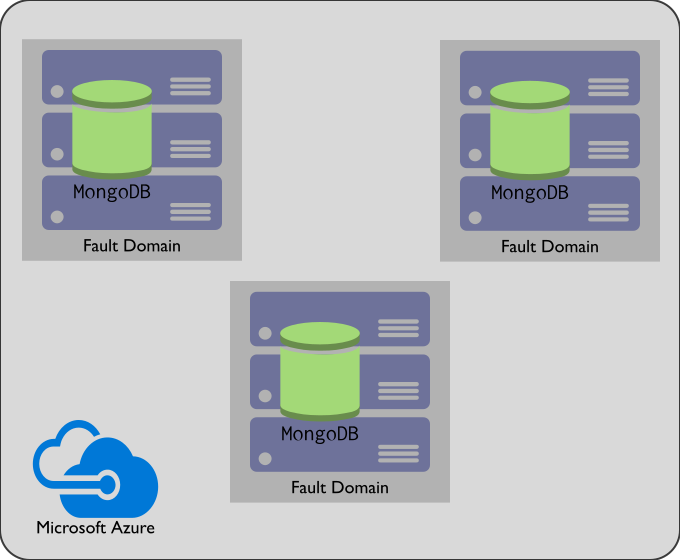
3FD clusters have higher availability compared to 2FD clusters. However, not all regions support 3FD clusters.
Regions with Only Two Fault Domains
If the selected Azure region has two fault domains, Atlas clusters are split across the two fault domains. For example, a three node replica set cluster would have two nodes deployed to one zone and the remaining node deployed to the other zone.
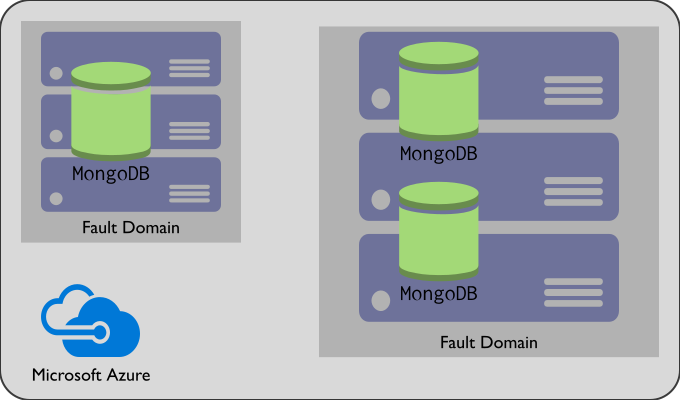
2FD clusters have a higher chance of loss of availability in the event of the loss of an zone than 3FD clusters. However, where latency or location are a priority, a region that supports 2FD clusters may be preferred.
| [1] | (1, 2) For detailed documentation on Azure storage options, see High-performance Premium Storage and managed disks for VMs |
Integrations
Along with global region support, the following product integrations enable applications running on Azure, such as Azure Virtual Machines, Azure Functions, and Azure Container Instances, to use Atlas instances easily and securely.
Networking Services
Azure Virtual Network: Set up network peering connections with Azure
Azure Private Link: Set up private endpoints with Azure
Azure Key Vault:
Security and Identity Services
Microsoft Entra ID: Configure federated authentication to the MongoDB UI
Microsoft Entra ID Domain Services: Configure database user authentication and authorization
Integrations with other Azure Services
Azure Databricks: Read and write to Atlas using Databricks and Apache Spark
Azure Data Factory: Copy data from or to MongoDB Atlas using Azure Data Factory or Synapse Analytics
More Information
For more information on how to use Azure with Atlas most effectively, review the following best practices, guides, and case studies:
Power BI Desktop: Connect to Atlas from Power BI Desktop
Visual Studio (VS) Code: Work with MongoDB from VS Code