Docs Home → Develop Applications → MongoDB Manual
Map-Reduce
Note
Aggregation Pipeline as Alternative
Starting in MongoDB 5.0, map-reduce is deprecated:
Instead of map-reduce, you should use an aggregation pipeline. Aggregation pipelines provide better performance and usability than map-reduce.
You can rewrite map-reduce operations using aggregation pipeline stages, such as
$group,$merge, and others.For map-reduce operations that require custom functionality, you can use the
$accumulatorand$functionaggregation operators. You can use those operators to define custom aggregation expressions in JavaScript.
For examples of aggregation pipeline alternatives to map-reduce, see:
You can run aggregation pipelines in the UI for deployments hosted in MongoDB Atlas.
Map-reduce is a data processing paradigm for condensing large volumes
of data into useful aggregated results. To perform map-reduce
operations, MongoDB provides the mapReduce database
command.
Consider the following map-reduce operation:
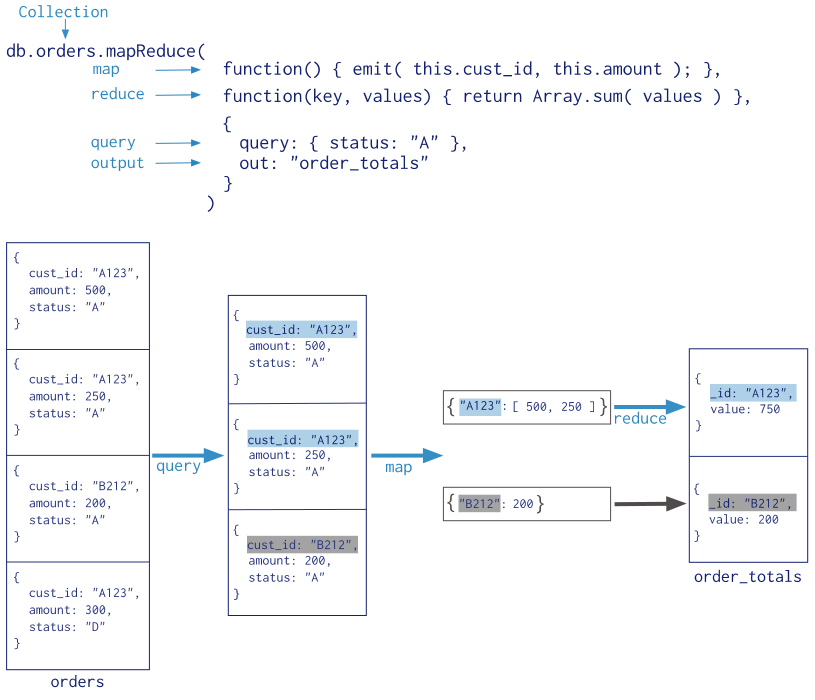
In this map-reduce operation, MongoDB applies the map phase to each input document (i.e. the documents in the collection that match the query condition). The map function emits key-value pairs. For those keys that have multiple values, MongoDB applies the reduce phase, which collects and condenses the aggregated data. MongoDB then stores the results in a collection. Optionally, the output of the reduce function may pass through a finalize function to further condense or process the results of the aggregation.
All map-reduce functions in MongoDB are JavaScript and run
within the mongod process. Map-reduce operations take the
documents of a single collection as the input and can perform
any arbitrary sorting and limiting before beginning the map stage.
mapReduce can return the results of a map-reduce operation
as a document, or may write the results to collections.
Note
Map-reduce is unsupported for MongoDB Atlas free clusters and MongoDB Atlas serverless instances.
Map-Reduce JavaScript Functions
In MongoDB, map-reduce operations use custom JavaScript functions to map, or associate, values to a key. If a key has multiple values mapped to it, the operation reduces the values for the key to a single object.
The use of custom JavaScript functions provide flexibility to map-reduce operations. For instance, when processing a document, the map function can create more than one key and value mapping or no mapping. Map-reduce operations can also use a custom JavaScript function to make final modifications to the results at the end of the map and reduce operation, such as perform additional calculations.
Map-Reduce Results
In MongoDB, the map-reduce operation can write results to a collection
or return the results inline. If you write map-reduce output to a
collection, you can perform subsequent map-reduce operations on the
same input collection that merge replace, merge, or reduce new results
with previous results. See mapReduce and
Perform Incremental Map-Reduce for details and
examples.
When returning the results of a map-reduce operation inline, the result documents must be within the BSON Document Size limit, which is currently 16 megabytes. For additional information on limits and restrictions on map-reduce operations, see the mapReduce reference page.
Sharded Collections
MongoDB supports map-reduce operations on sharded collections.
However, starting in version 4.2, MongoDB deprecates the map-reduce
option to create a new sharded collection and the use of the
sharded option for map-reduce. To output to a sharded collection,
create the sharded collection first. MongoDB 4.2 also deprecates the
replacement of an existing sharded collection.
Views
Views do not support map-reduce operations.